QuotchiExample readings

A little room to keep building.
Some limits may be missing.
 Claude Code
5-hour used24%
Reset unavailable
Weekly used32%
Resets in 3h 20m
 Codex
Codex
Weekly used38%
Resets in 3d
 Get Quotchi
 A companion for Mac AI builders
Check your Claude Code and Codex limits without opening each tool. Usage, resets and gentle alerts. Together in your Mac menu bar.
Downloads open at launch.
Free core · Apple silicon · macOS 14+
Cl 32% · 1w 12:34Some limits may be missing.
Claude CodeReset unavailable
Resets in 3h 20m
CodexResets in 3d

Made for the tools
you build with.
Claude CodeExperimental plan quotaCodexReported windows · partial coverageA little less checking
Check what’s left. Choose your heads-up. Make your building story yours.
See reported usage windows and reset times in Now. Partial coverage and unknown limits stay marked.
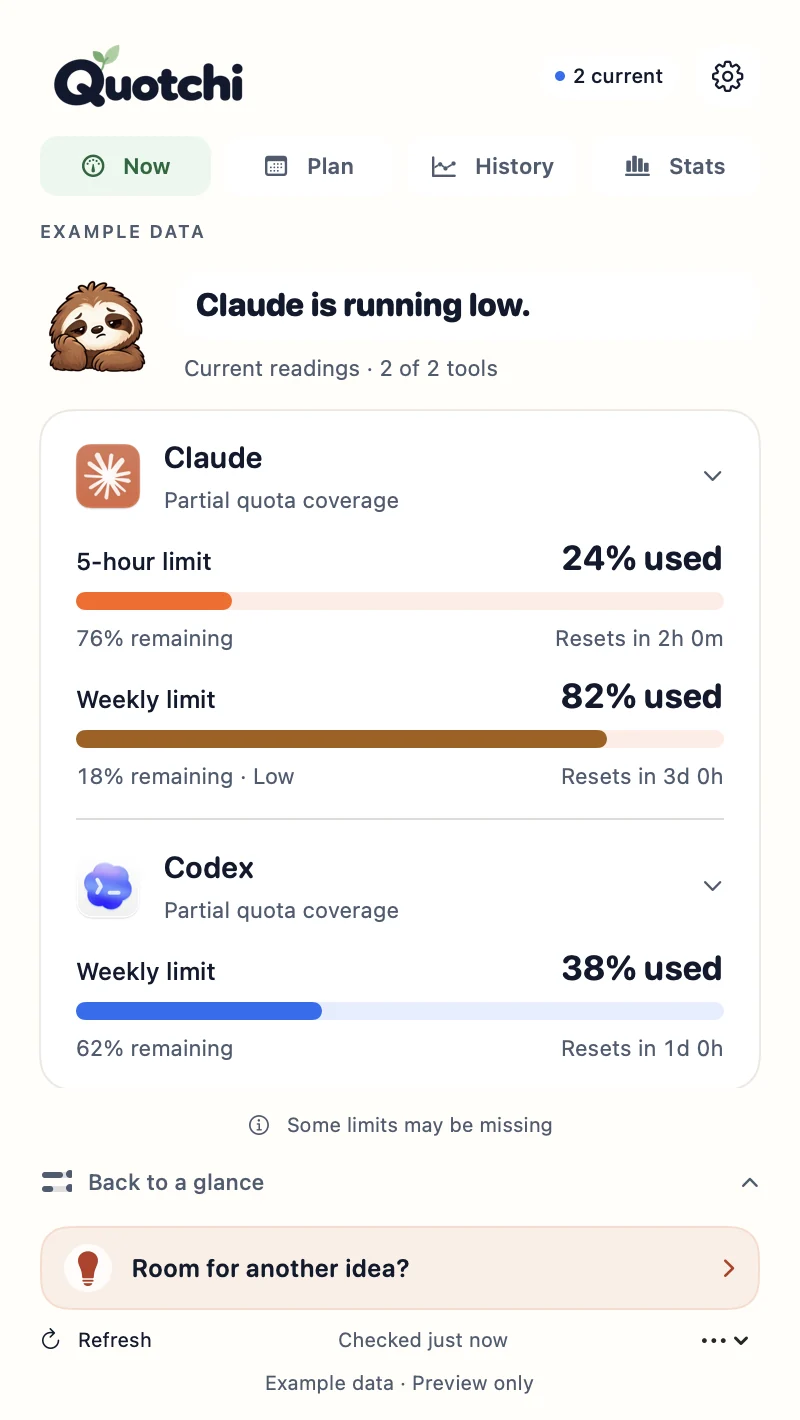
Native app detail · example data
A record of your building
See your local token totals. Find your leading model. Make a card worth sharing.
Example Claude Code records
Your totals and a Field Notes card are Free. Explore deeper and customize your cards with Pro.
Local records, not whole-account billing. Token totals include cache.
Available records may be incomplete. Claude reports token traffic including cache; Codex model counts describe chats. Gemini token stats are unavailable. Stats and saved observations are optional and stay on your Mac.
No prompts, responses or project transcripts. Optional history and Stats stay on your Mac. Usage checks contact your provider.
How Quotchi handles data ↗Make Quotchi yours
Pro adds context, control and a little more personality.
Beside your next idea
Float Quotchi beside your work, or tuck it into a screen-edge tab. Your tools. Your little corner of the desktop.
A clearer picture
Compare saved readings and periods, with resets and gaps kept visible. History stays local and optional.
A gentler heads-up
Set a warning for each reported limit. Add quiet hours. Make your heads-up fit your day.
Native renders with example data · Includes everything in Free
Find your planStart with the essentials. Go deeper when you want to.
A clear view of your limits, resets and everyday building.
Choose your tools and menu-bar view, check current reported capacity and reset schedules, use basic alerts and native widgets, and explore basic local Stats. Data export and deletion controls stay Free.
Downloads open at launch.
Understand your patterns and make Quotchi yours. Includes everything in Free.
Launch offer · first 50 at $5
Yours for life.
Lifetime Pro · 2 Macs · all future updates
Includes Free, plus local history and comparisons, model/activity exploration, saved Stats trends, custom card themes, formats and headlines, custom alerts, digests, work blocks and floating or screen-edge companions. Recent pace is experimental and opt-in.
Checkout opens at launch.
250 early-price licenses in five batches of 50, starting at $5. Each batch costs $5 more, then $29 ongoing. Every batch gets the same Pro plan; only the price changes.
Launch pricing is shown below. Live availability appears when checkout opens.
One-time prices in USD. Applicable tax shown at checkout. Your price is confirmed at checkout.
Claude Code plan-quota reading is experimental. Codex reports supported windows with partial coverage; account mode matters. Gemini has a separate optional experimental app-pane reader. Review compatibility and versions.
After your purchase, import the signed license file in Quotchi → Settings → Pro. Keep the original file to restore access or use it on your second Mac. See activation and recovery.
Yes. Contact [email protected] within seven days of purchase to request a refund. Refund details.
Download Quotchi for your Apple silicon Mac running macOS 14 or later. Connect your supported tools in Settings, then choose your menu-bar view. The core features are Free; Pro adds deeper insights and customization.
No. Quotchi does not collect prompts, responses, projects or transcripts. Optional history is kept locally on your Mac.
Pro is a lifetime license for two Macs, with all future Quotchi Pro updates included. Pay once; no subscription. Every launch-price batch includes the same Pro plan. License and seven-day refund details.
Basic local totals, the leading model and a Field Notes token card are Free. Pro adds deeper exploration, saved observations and custom card stories/styles. These summarize local records, not whole-account billing. Claude labels cache traffic; Codex models count chats. Gemini token stats are unavailable.
No guaranteed coding time. Pro’s optional Recent pace is experimental and compares saved readings under a continued-pace assumption. See prerequisites and limitations.
For your next “one more idea.”
A calmer view of your limits. A little more room for your ideas. Start with Quotchi Free and make it yours.
Build more. Worry less.

Downloads open at launch.
Check compatibility ↗